
Insecure WebSocket Authentication
Many of the same vulnerability classes exist in applications that are using WebSockets that would exist in web applications using HTTP polling, except that the way that these issues are exploited are WebSockets specific.
Such as:
Transmitting sensitive data in cleartext (WS:// instead of WSS://)
User input validation issues
Authentication/Authorization issues
Origin Header Verification / Cross-site Request Forgery (CSRF)
The WebSocket standard defines an Origin header field, which web browsers set to the URL that originates a WebSocket request. This can be used to differentiate between WebSocket connections from different hosts, or between those made from a browser and some other kind of network client. However, remember that the Origin header is essentially advisory: non-browser clients can easily set the Origin header to any value, and thus “pretend” to be a browser.
You can think of the Origin header as roughly analogous to the X-Requested-With header used by AJAX requests. Web browsers send a header of X-Requested-With: XMLHttpRequest, which can be used to distinguish between AJAX requests made by a browser and those made directly. However, this header is easily set by non-browser clients, and thus isn’t trusted as a source of authentication.
In the same way, you can use the Origin header as an advisory mechanism—one that helps differentiate WebSocket requests from different locations and hosts, but you shouldn’t rely on it as a source of authentication.
Because authentication and authorization is not inherently handled in the protocol, it is the developers responsibility to implement this at the application level in WebSockets.
This is what the WebSockets RFC has to say about WebSocket client authentication.
This protocol doesn't prescribe any particular way that servers can authenticate clients during the WebSocket handshake. The WebSocket server can use any client authentication mechanism available to a generic HTTP server, such as cookies, HTTP authentication, or TLS authentication. RFC6455
WebSocket Opening Handshake Sec-WebSocket-Key Header
In the WebSocket opening handshake the Sec-WebSocket-Key header is used to ensure that the server does not accept connections from non-WebSocket clients. This is not used for authentication.
Chrome Developer Tools WebSockets Testing
When reviewing WebSocket applications for security issues, ZAP or Burp may be able to read, or even modify some WebSockets frames. However, I have found that in some applications attempting to modify/replay messages may break the socket connection, or otherwise go wrong. You may have better results by calling the WebSockets API directly, or using the API of the implementation used by the application. Eg., Socket.io, SockJS, WS, etc.
Chrome Developer Tools provides an easy way to view WebSockets messages, correctly unmasks data frames, and will allow you to test applications that are using WebSockets. To view WebSocket frames, go to Developer Tools, Network, WS tab:
Reviewing Slack WebSocket messages in Chrome

WebSocket API Basic Usage
Using the WebSocket API to send and recieve messages.
Socket.io (WebSockets Realtime Framework) Basic Usage
If the application is using Socket.io, the server will serve the path /socket.io by default. This is where engine.io and socket.io.js are served from.
Server Console Application
This is one example of an application which required authentication for the web application, but not for the WebSocket connection.
There was server console functionality included in the application stack, that used Socket.io to communicate system commands in realtime.
In reviewing the socket frames when authenticated to the console, it was evident that WebSocket messages containing system commands were passed without authorization tokens, or authentication required before the socket connection was established.
So from this point, it was just a matter of connecting to the WebSocket endpoint directly which did not require any authentication:
var socket = io.connect('http://host/console);

Returning custom 'data' socket messages from the server (so we get responses to our commands):
socket.on('data', function (data) { console.log(data); });
Emitting a custom socket message:
socket.emit('command', 'cat /etc/passwd');
Emitting a command, and receiving the socket response

Round.io (Demo chat application)
Someone created an interesting concept for a chat application that uses WebSockets to allow you to chat with people around the world, and displays their location on a map. The UI will use the browser geolocation to show where you are chatting from; if this is not supplied, the UI will not allow the user to chat. For demo purposes, and to play with the concept of application authorization, deny the browser access to your geolocation when it is requested. https://round.io/chat/
Connect using the WebSocket API:
var socket = new WebSocket('wss://round.io/socket.io/?EIO=3&transport=websocket');
Send a chat message with coordinates, and nickname. eg.
socket.send('42["outgoing message",{"msgtext":"Nobody exists on purpose Summer","lat":53.06,"lng":6.57,"nickname":"Morty"}]');
round.io chat application
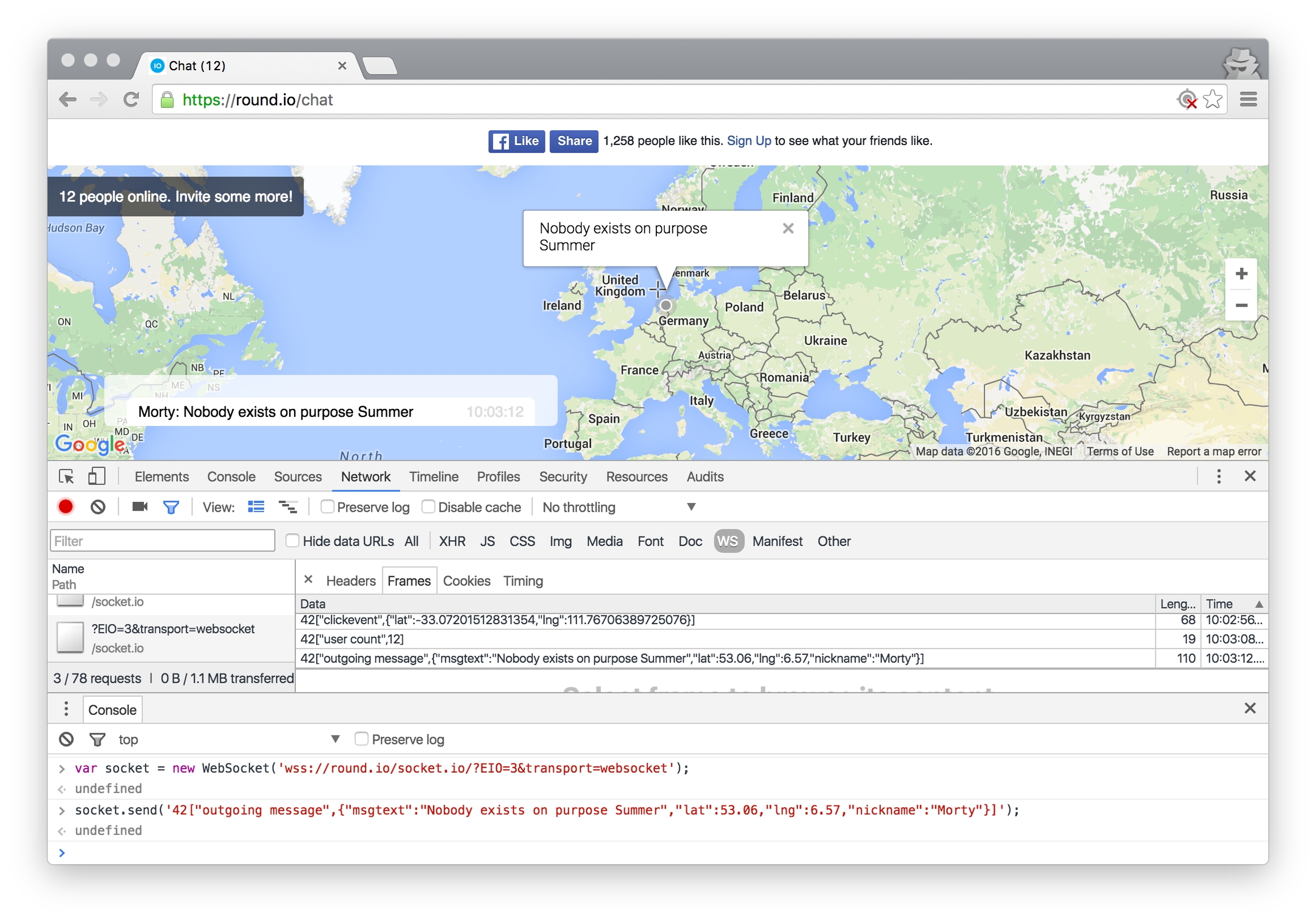
Even if an application does not provide any visible user inputs, communication sent to the WebSocket can still be manipulated, allow attacks against users connected to the socket, or allow attacks against the server.
Auth0 has a nice post on how to require authentication in Socket.io with cookie-based or token-based authentication: https://auth0.com/blog/2014/01/15/auth-with-socket-io/
Authentication can also be passed in the WebSocket URI when connecting. The issue with this method is that authorization will be passed in a GET request which will remain latent in proxy logs, so that issue will need to be mitigated: http://dev.datasift.com/docs/api/streaming-api/websockets-streaming
The messaging service Slack takes this approach in authenticating to their real time messaging (RTM) API. Their API describes a single-use WebSocket URI that is only valid for 30 seconds. https://api.slack.com/rtm
If you have any comments about this, you can find me here.
Craig is a security consultant at Stratum Security. Stratum is a boutique security consulting company specializing in application security, data exfiltration and network security.
References:
Last updated